The Nexus Interface
This is a proof of concept but it is also built and running. Hover over the glowing dots to explore each feature area.
Dashboard Home
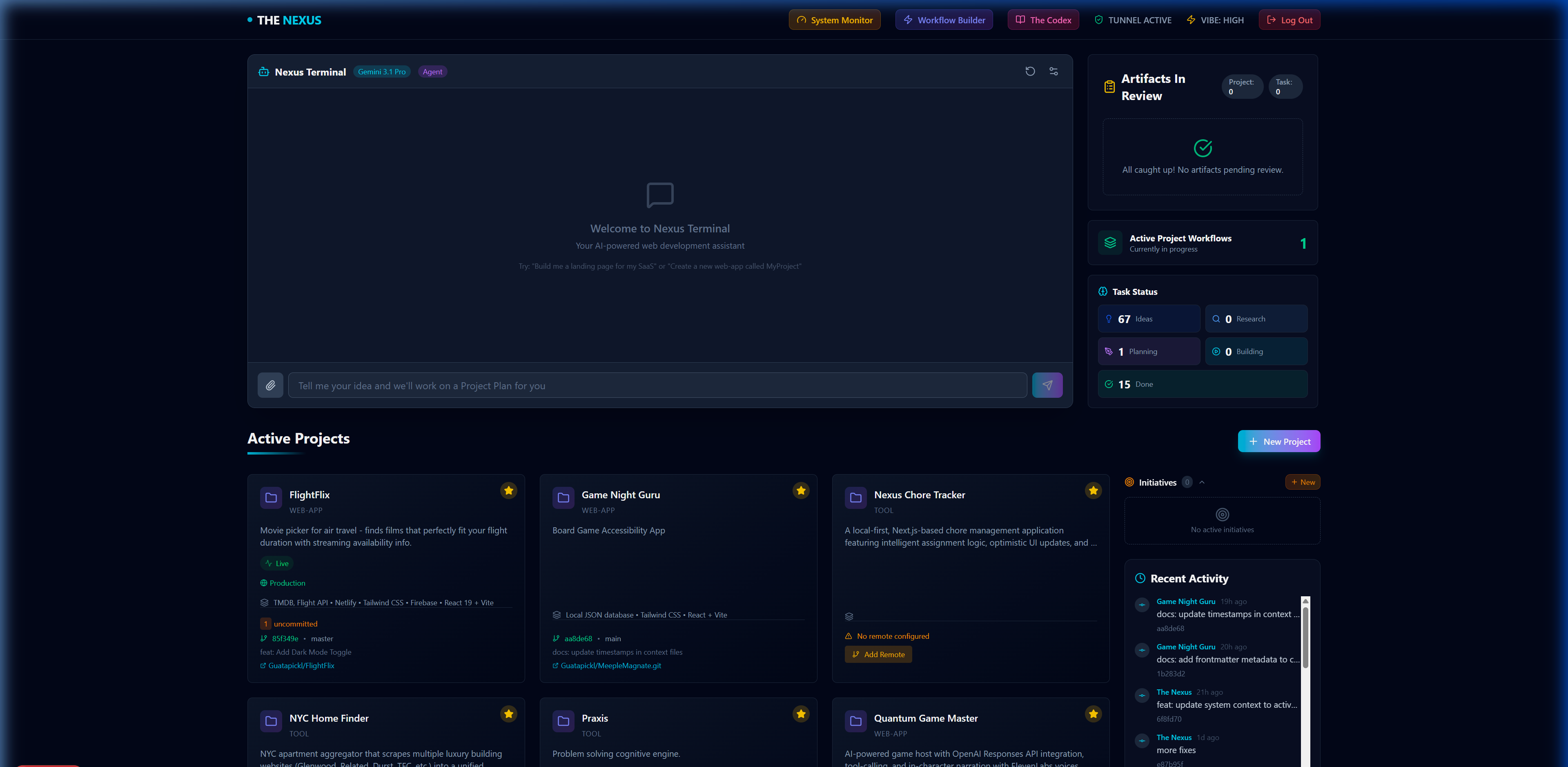
The central hub for all active projects and initiatives. Your command center for the entire AI mesh.
Navigation Bar
Quick access to the System Monitor, Workflow Builder, The Codex documentation, and the live Cloudflare Tunnel status indicator.
Model Selector & Agent Mode
Choose between AI models from multiple providers and toggle Agent Mode for full orchestration vs. simple chat.
Nexus Terminal
The primary AI interface. Submit natural language prompts to trigger the Cortex orchestrator, generate project plans, and execute complex multi-step workflows.
Artifacts In Review
A centralized queue for the Human-in-the-Loop review process. Plans and generated code wait here for your approval before the system proceeds.
Active Project Workflows
Live count of currently running orchestration workflows across all projects. Click to monitor their progress in real-time.
Global Task Status
Aggregated task pipeline across every project — Ideas, Research, Planning, Building, and Done — giving a bird's-eye view of total workload.
Active Projects
Card grid of all managed projects. Each card shows the project type, description, deployment status (Live/Draft), tech stack, and latest Git activity.
+ New Project
Scaffold a brand-new software project. Creates the Supabase record, initializes a .context directory, and optionally triggers an AI-driven planning workflow.
Initiatives Panel
High-level strategic goals that span multiple projects. An Initiative can kick off several Project Workflows in parallel.
Recent Activity Feed
A chronological stream of commits, context updates, and workflow completions across the entire Nexus ecosystem.
Project Git Info
Each project card shows branch info, latest commit hash, and a direct link to the GitHub repository for quick navigation.
Project Workspace
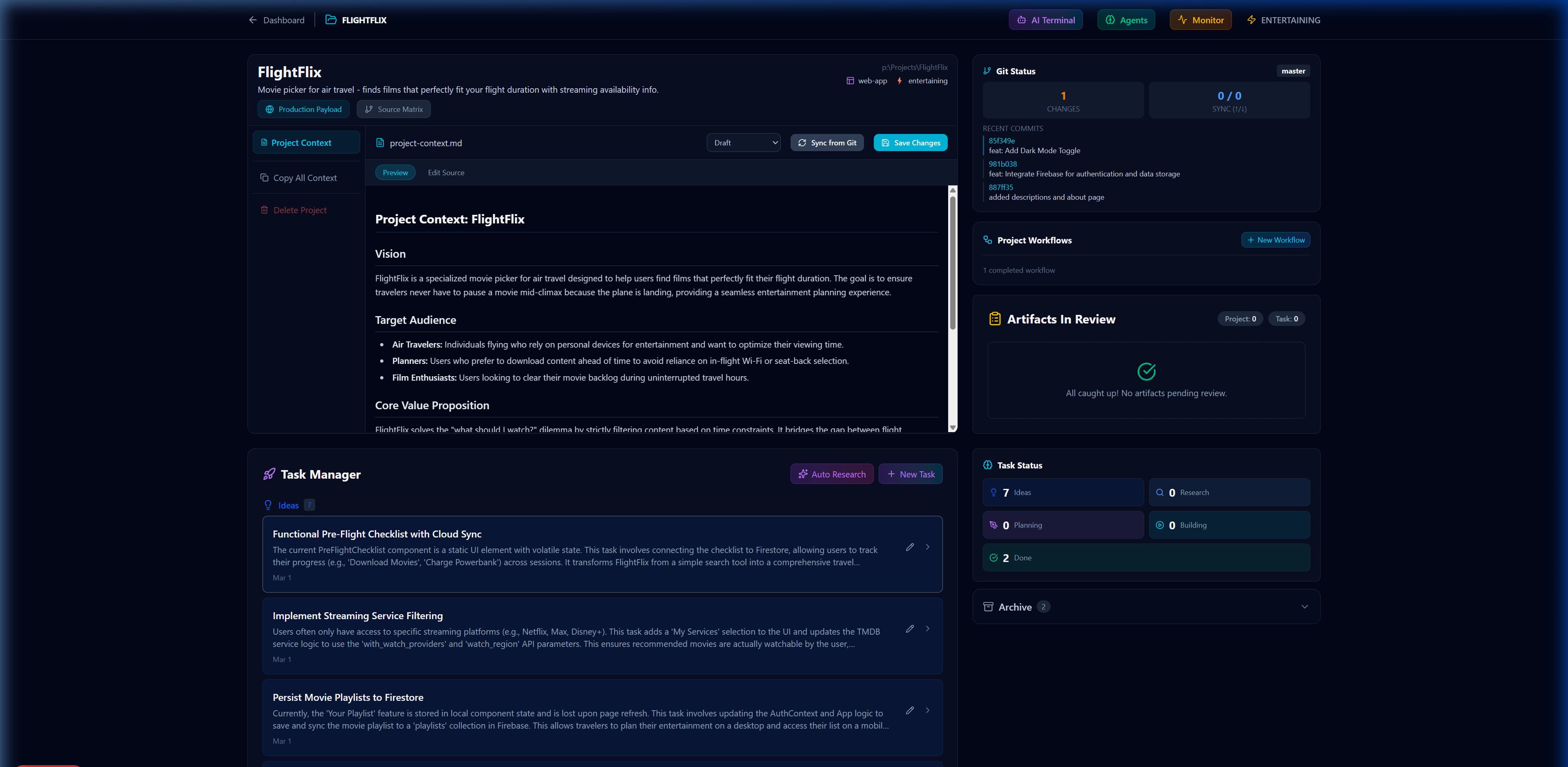
The dedicated workspace for a single software project. Context, tasks, workflows, and source control converge here.
Project Header
Shows the project name, description, type badge (web-app, tool), file path, and vibe mode. Quick links for Production site and Github views.
Context Sidebar
Dynamic file browser for the .context/ directory. Select documents like project-context.md, api-reference.md, or tech-stack.md to view and edit.
Context Editor
Live markdown editor with Preview/Edit Source toggle. Supports Draft and Published states, Git sync, and direct save to Supabase. A Copy All Context button enables quick communication about complex projects.
Project Context Document
The AI's memory for this project — Vision, Target Audience, Core Value Proposition, and Architecture decisions. This context is injected into every AI interaction scoped to this project.
Git Status Panel
Real-time sync with the local repo: uncommitted changes count, sync status with remote, branch info, and a scrollable list of recent commits.
Project Workflows
Trigger full orchestration workflows scoped to this project. Shows completed and active workflow count with a "+ New Workflow" button.
Artifacts In Review
Project-scoped and Task-scoped artifact review queue. AI-generated plans and code blocks appear here awaiting human approval before execution.
Task Status Sidebar
Visual pipeline showing tasks by status: Ideas → Research → Planning → Building → Done. Provides at-a-glance progress for the entire project.
Task Manager
The main task list with full descriptions, creation dates, and action buttons. Supports Auto Research (AI-driven task expansion) and manual "+ New Task" creation.
Task Cards
Each task shows its title, detailed description, timestamp, and quick-action icons for editing or navigating to the full task detail view.
Archive
Collapsed section for completed and deprecated tasks. Keeps the workspace clean while preserving full history.
Delete Project
Danger Zone action with multi-scope confirmation. Removes project data from Supabase, optionally deletes local files and the .context directory.
System Monitor
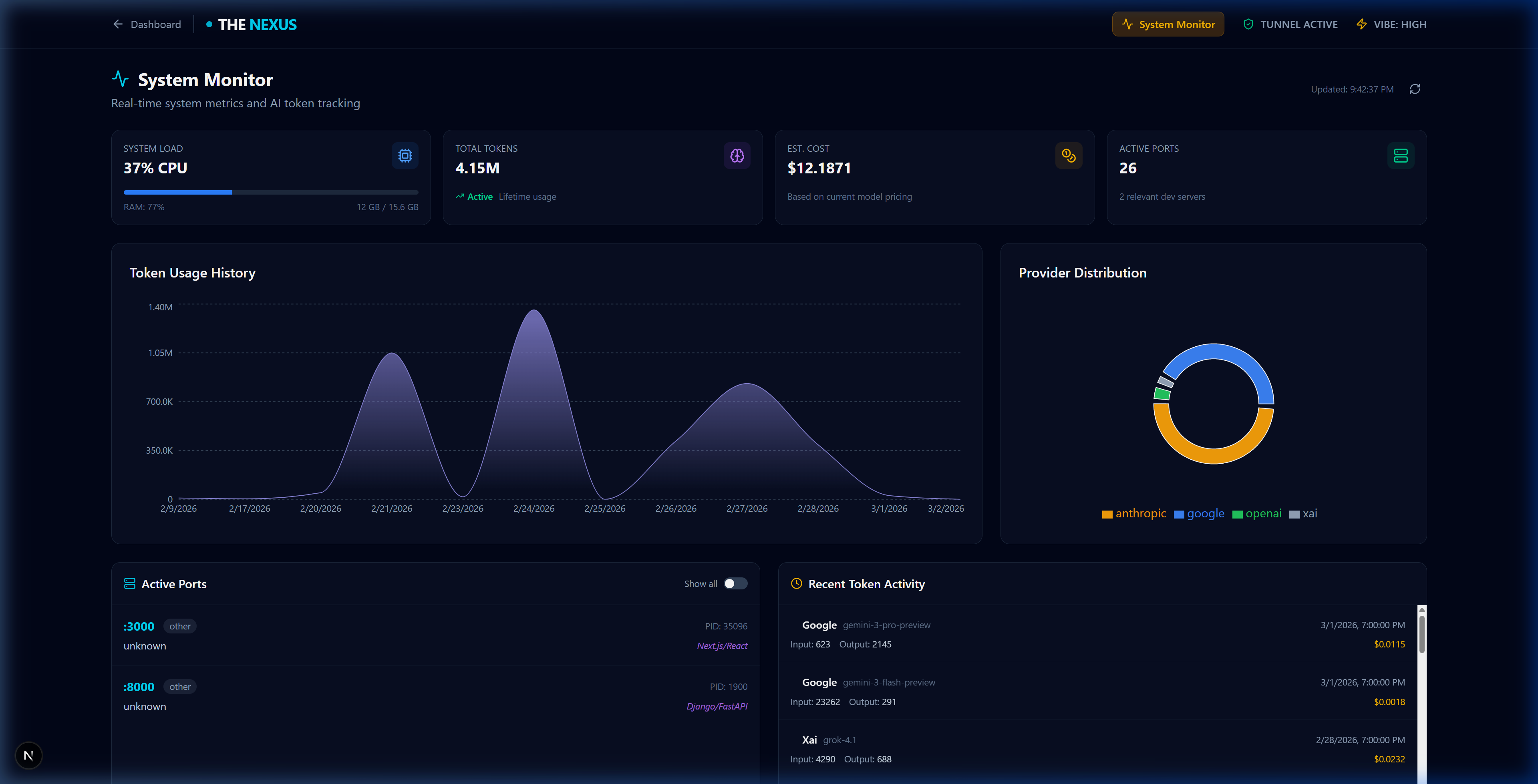
Real-time system metrics and AI token tracking. Keep a pulse on your active dev servers and model usage.
System Load & Tokens
CPU and memory utilization alongside aggregate lifetime token usage and estimated cost across all projects.
Token Usage History
Visualize spikes in AI activity. Useful for tracking down expensive workflows or monitoring heavy deliberation phases.
Provider Distribution
A breakdown of token usage across different AI providers, helping you balance workloads across your configured models.
Active Ports
A live registry of all running development servers (Next.js, FastAPI, etc.) and their associated Process IDs.
Workflow Builder
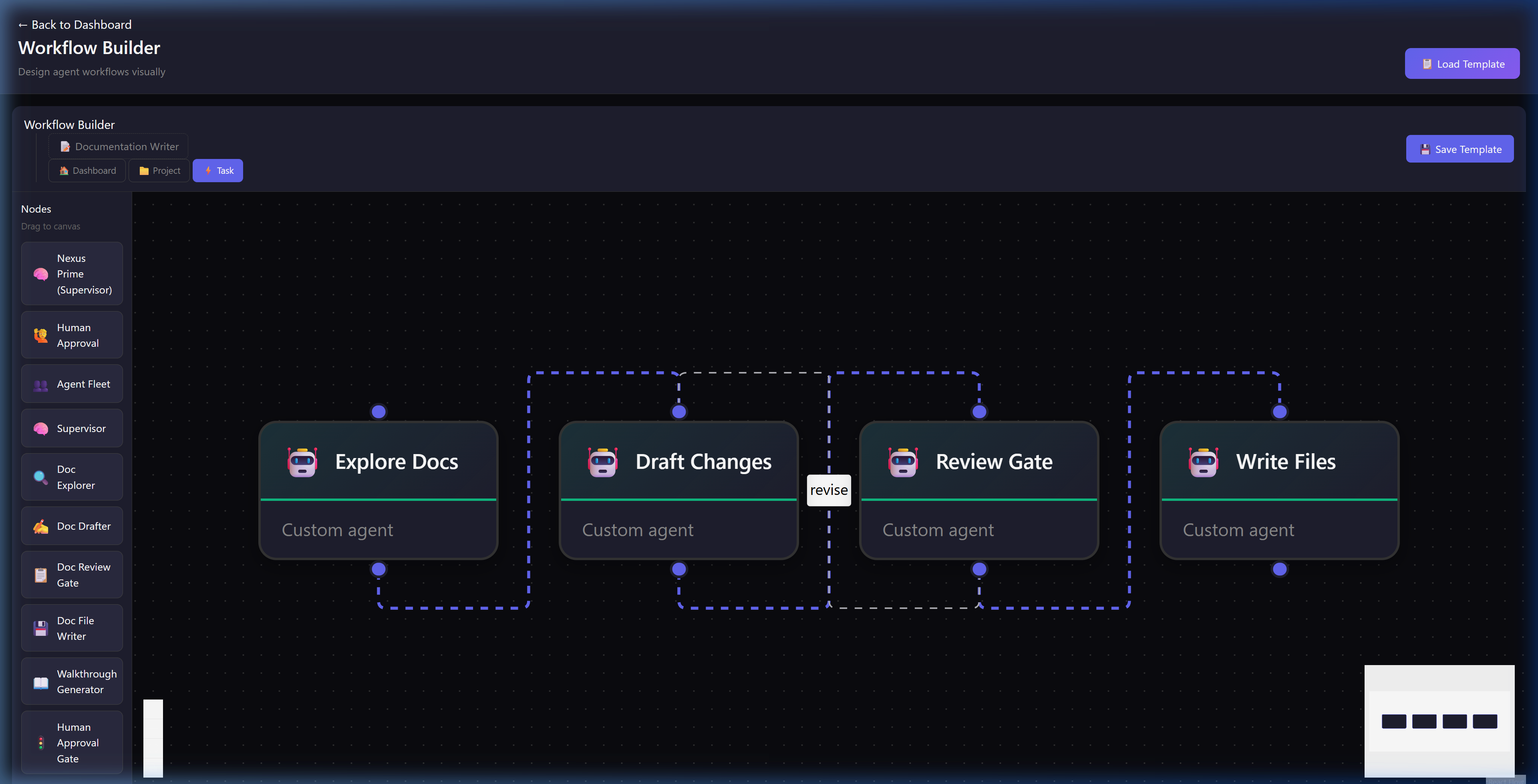
Design agent workflows visually. Craft custom pipelines of specialized AI nodes connected by shared context.
Node Canvas
Drag, drop, and connect agents to form complex multi-step pipelines. Here, a Documentation Writer workflow is active.
Review Gate Node
A specialized checkpoint node. Execution pauses here and sends a notification to the user, awaiting explicit human approval before proceeding.
Node Toolbox
A registry of available agent abilities. Drag specialized nodes like Doc Explorer or Walkthrough Generator directly onto the canvas.
Save / Load Template
Save your meticulously crafted workflows as JSON templates, making them instantly reusable across any project in the mesh.